
Microsegmentation with Proxmox VE, SDN, and VLAN Zones
Frank Bartkewitz
Abstract
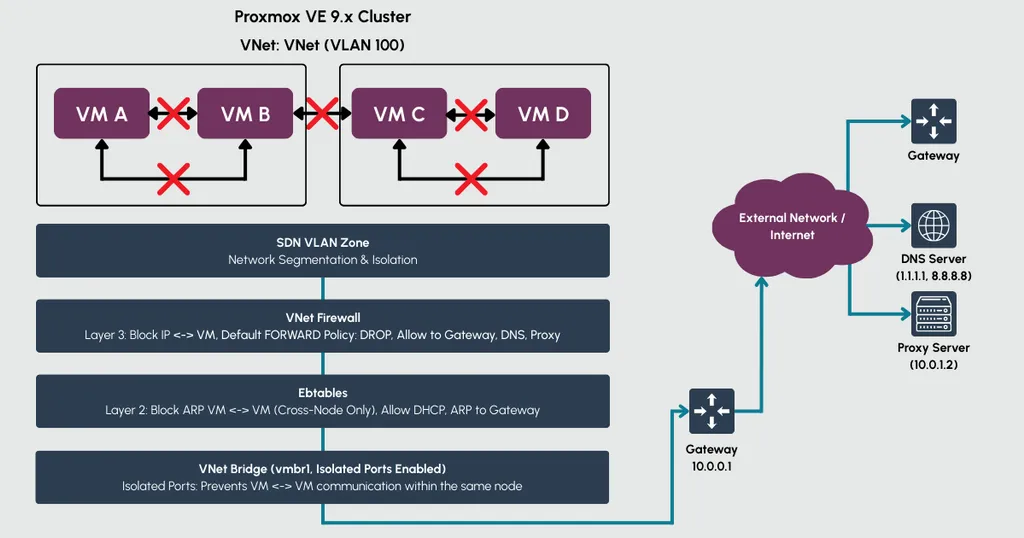
Microsegmentation prevents lateral movement in virtualized environments by isolating VMs even within the same network segment. This article demonstrates how to achieve true microsegmentation in Proxmox VE using a layered approach: SDN with VLAN zones for network management, the integrated VNet firewall for Layer 3 isolation, and nftables for Layer 2 (ARP) filtering. The scope of this article is limited to IPv4 environments.
Key takeaways: The Proxmox firewall alone cannot provide complete isolation since it operates only at Layer 3. Nftables rules are deployed cluster-wide via ifupdown2 hooks for seamless integration with Proxmox SDN. This solution is particularly relevant for multi-tenant environments or integration with external SDN controllers like Cisco ACI.
1. Introduction: Why Microsegmentation?
Traditional network security focuses on the perimeter: firewalls protect the boundary between trusted and untrusted networks. Microsegmentation takes a different approach. It assumes threats may already exist inside the network and therefore restricts communication between workloads, even when they share the same network segment. Common usecases include multi-tenant hosting environments, compliance requirements such as PCI-DSS or HIPAA, Zero Trust implementations, and isolating development or lab workloads from production systems.
In a Proxmox VE environment, VMs connected to the same bridge can communicate freely by default, both at Layer 3 (IP) and Layer 2 (ARP, broadcast). An attacker who compromises one VM can discover and attack neighboring VMs through ARP scanning, even before attempting any IP-based exploits.
The Proxmox VE firewall, including the VNet firewall introduced with SDN, operates at Layer 3. It can block IP traffic between VMs effectively. However, ARP requests pass through unfiltered. VMs can still discover each other's MAC addresses and detect their presence on the network.
True microsegmentation requires control at both layers. This article presents a solution that combines Proxmox SDN, the VNet firewall, and nftables to achieve complete VM isolation within shared network segments.
2. Solution Overview
The solution combines three components, each addressing a specific layer of isolation.
Proxmox SDN with VLAN Zones provides the network foundation. A VLAN zone maps VNets to physical network infrastructure through VLAN tags. Within a VNet, the "Isolate Ports" option prevents direct communication between VMs on the same node by configuring port isolation at the bridge level. However, this only works locally, VMs on different cluster nodes can still communicate.
The VNet Firewall extends isolation across the cluster. It operates at the datacenter level and filters Layer 3 traffic for all VMs attached to a VNet, regardless of which node they run on. Rules permit traffic between VMs and the gateway while blocking direct VM-to-VM communication. The firewall uses IPSets with the notation +sdn/<vnet-name>-all to dynamically reference all IPs within a VNet.
Nftables closes the remaining gap at Layer 2. Since the VNet firewall cannot filter ARP traffic, VMs could still discover each other through ARP requests. Nftables rules applied to the VNet bridge restrict ARP communication to the gateway only. All other intra-bridge ARP traffic is dropped.
The three layers work together: SDN provides structure and local isolation, the VNet firewall handles cluster-wide Layer 3 blocking, and nftables prevents Layer 2 discovery. Traffic to and from the gateway remains unaffected, allowing VMs to communicate with external networks while being completely isolated from each other.
3. Configuration
This section walks through the complete setup using a concrete example:
A PVE cluster with four nodes (vl-srv1-4).
External connection for VLAN is provided by vmbr2.
A VNet named vnet144 with VLAN tag 144 and gateway 172.31.144.1.
3.1 SDN Zone and VNet Setup
First, create a VLAN zone under Datacenter - SDN - Zones.
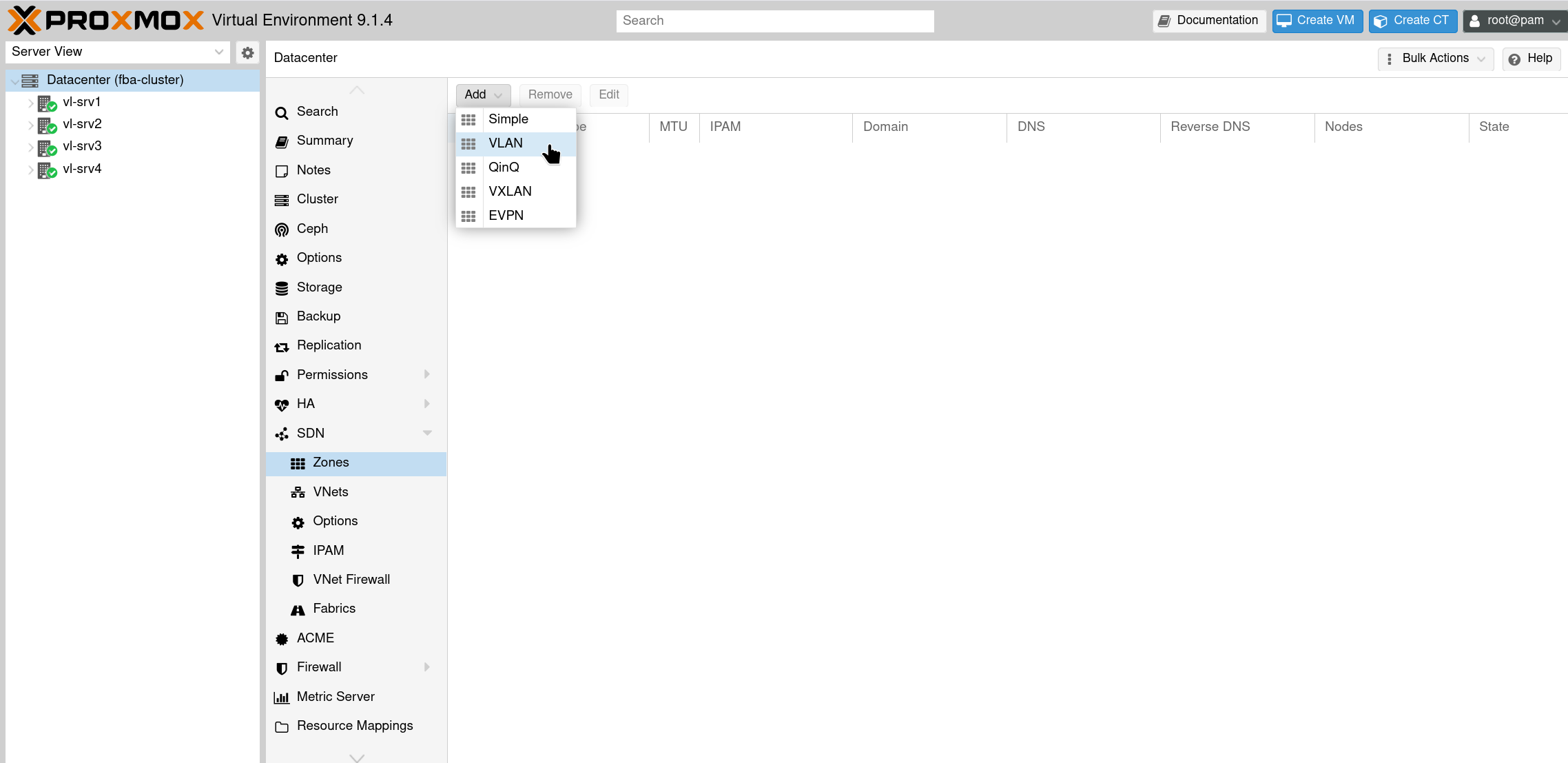
Select SDN - Zones and Add a VLAN zone
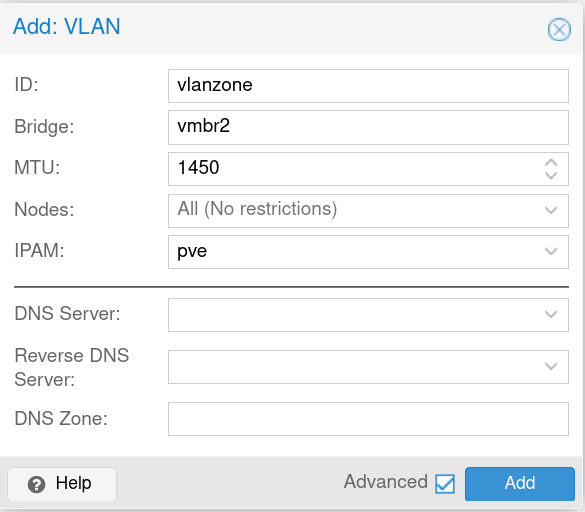
Configure the zone with an ID and select the bridge that connects to your physical network infrastructure. MTU setting depends on the physical network, mine requires 1450.
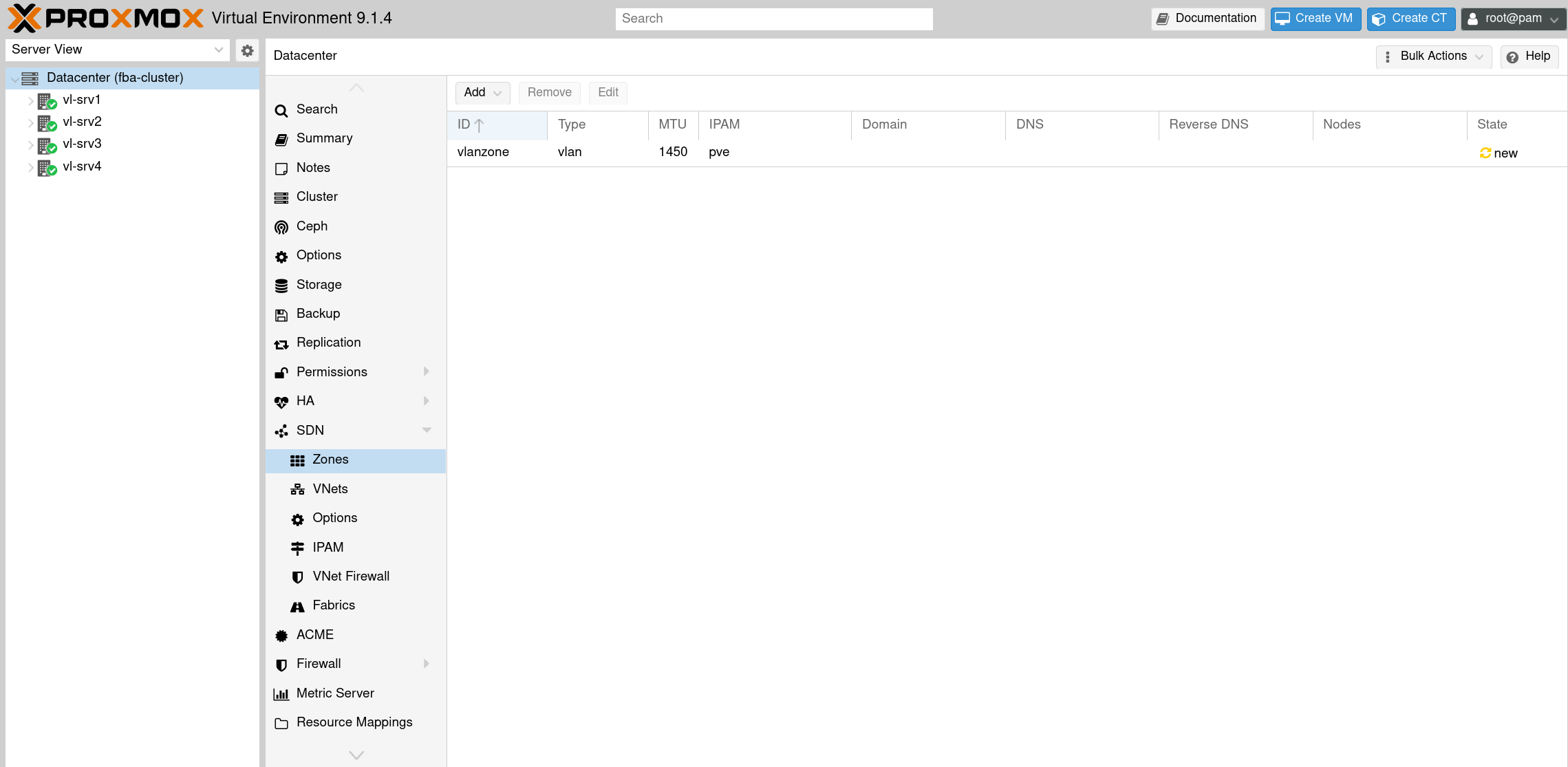
VLAN Zone is created
Next, create a VNet under Datacenter - SDN - VNets.
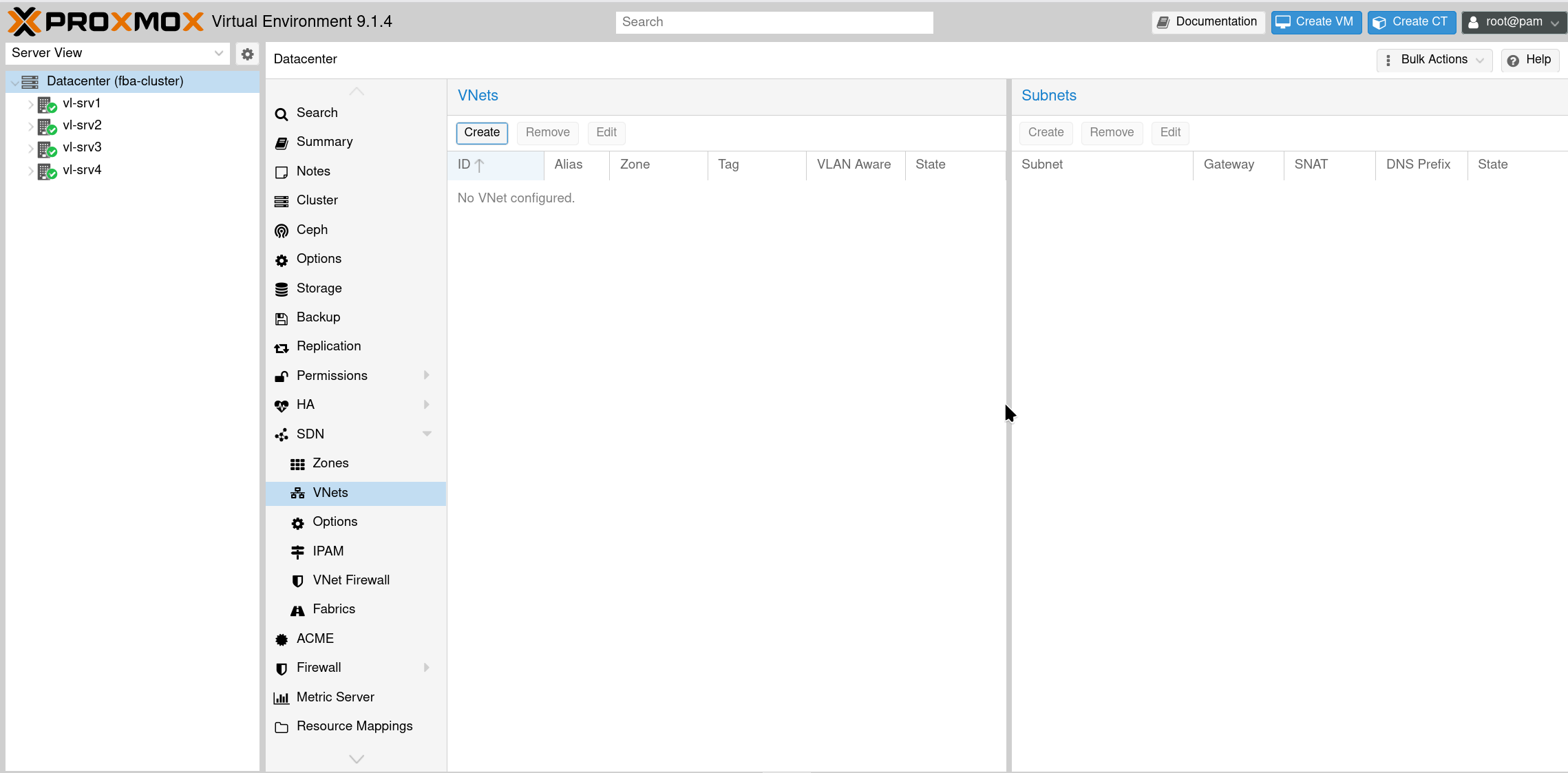
Create VNet
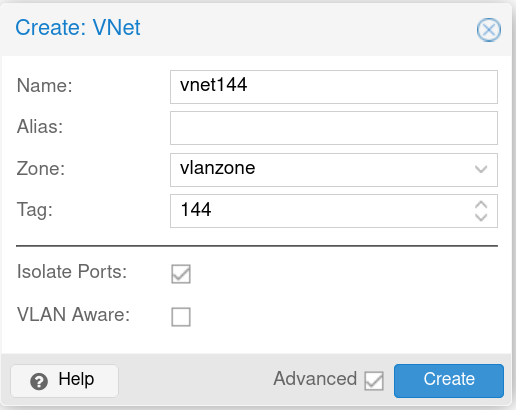
Configure VNet - Assign the VNet to your VLAN zone, set the VLAN tag, and enable Isolate Ports for local node isolation.
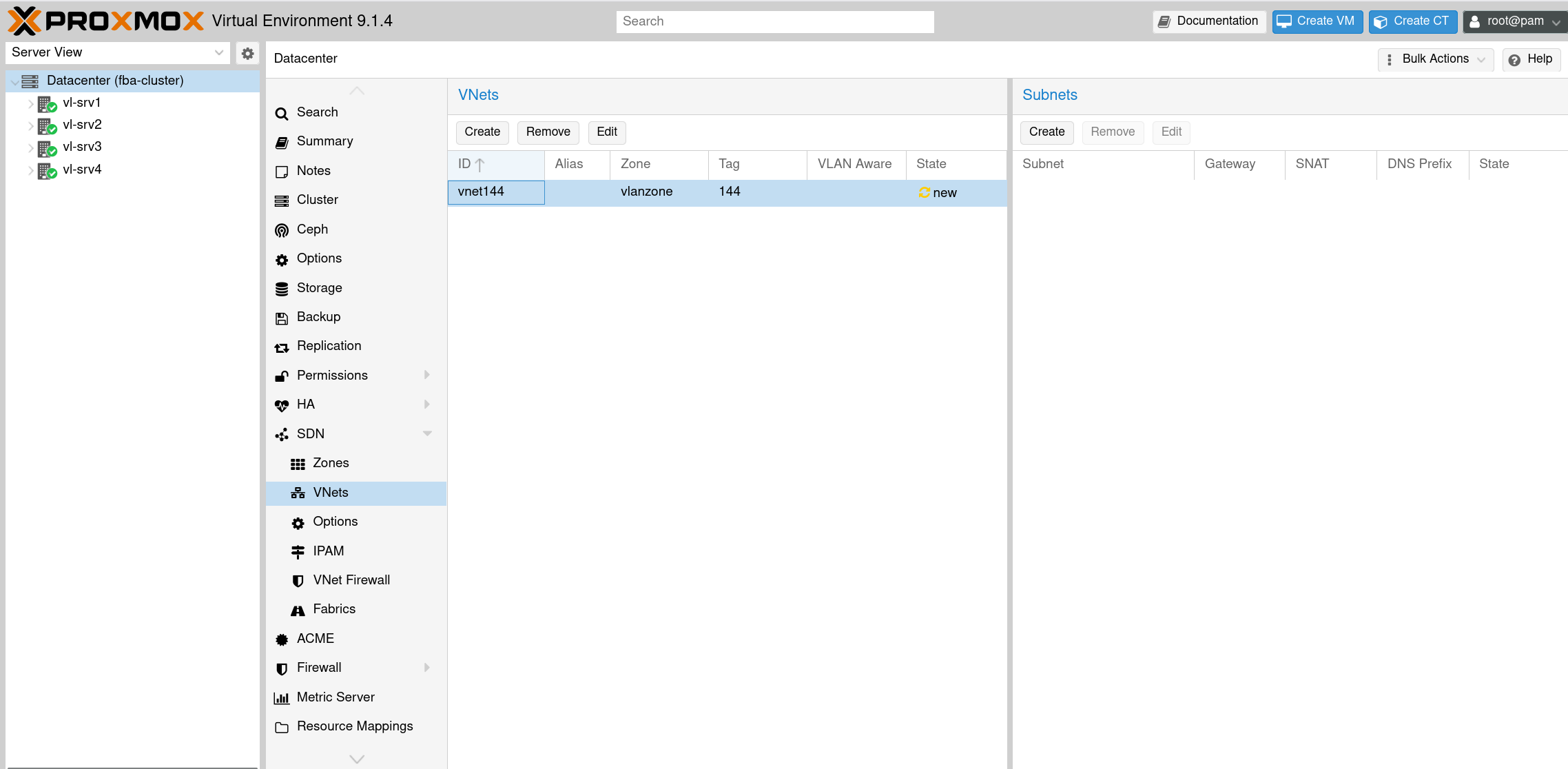
VNet is created
Each VNet requires at least one subnet for the VNet firewall to reference VM IPs correctly.
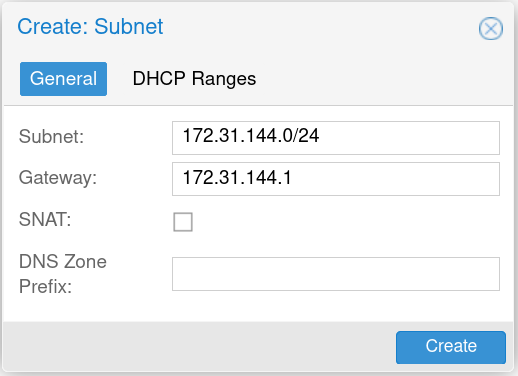
Configure Subnet
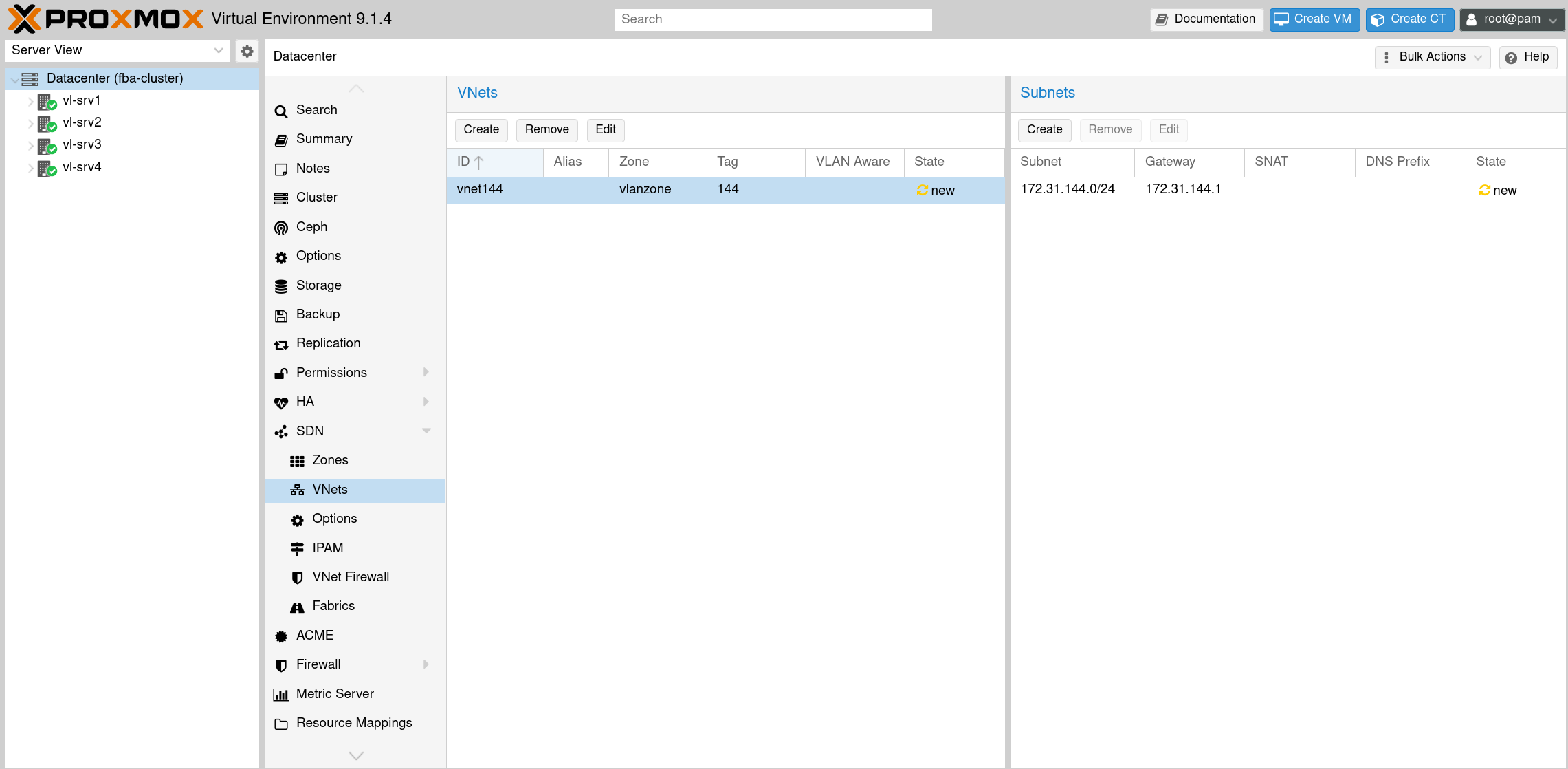
Subnet for VNet is added
After completing the configuration, apply the changes to activate the SDN setup across the cluster.
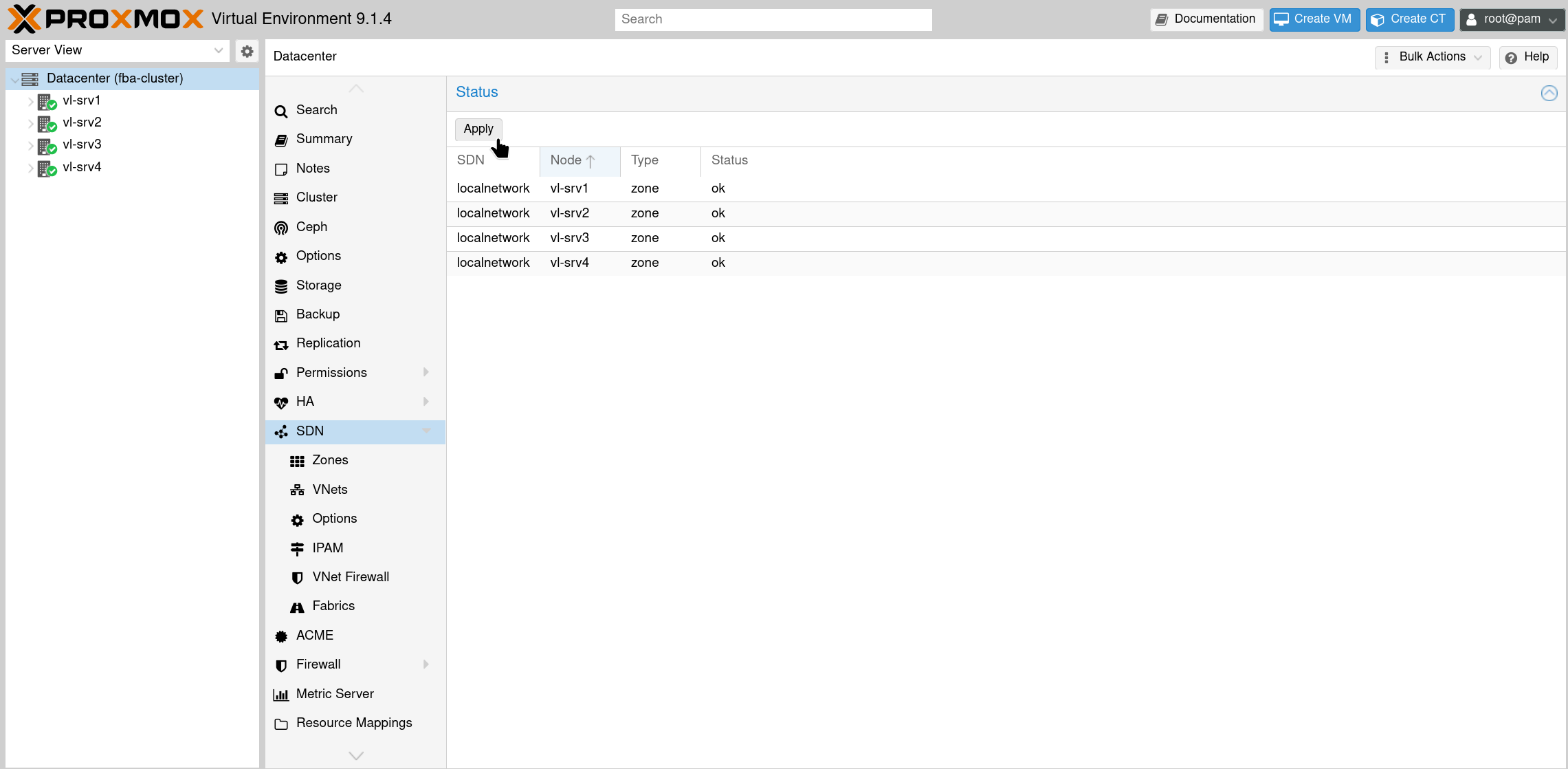
SDN configuration changes not yet reflected
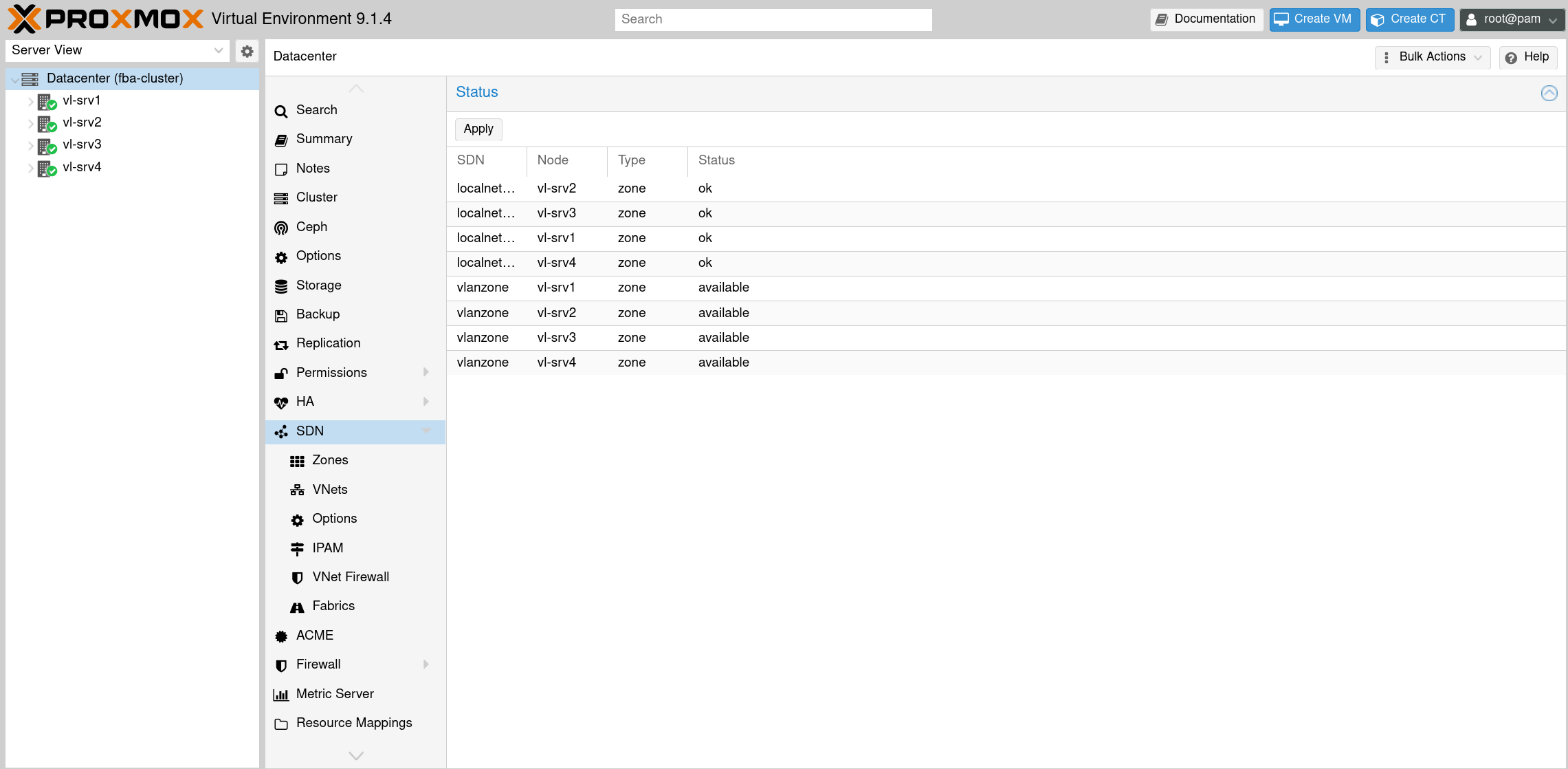
It takes a moment for the changes to apply
3.2 VNet Firewall Configuration
The VNet firewall is configured under Datacenter - Firewall - SDN.
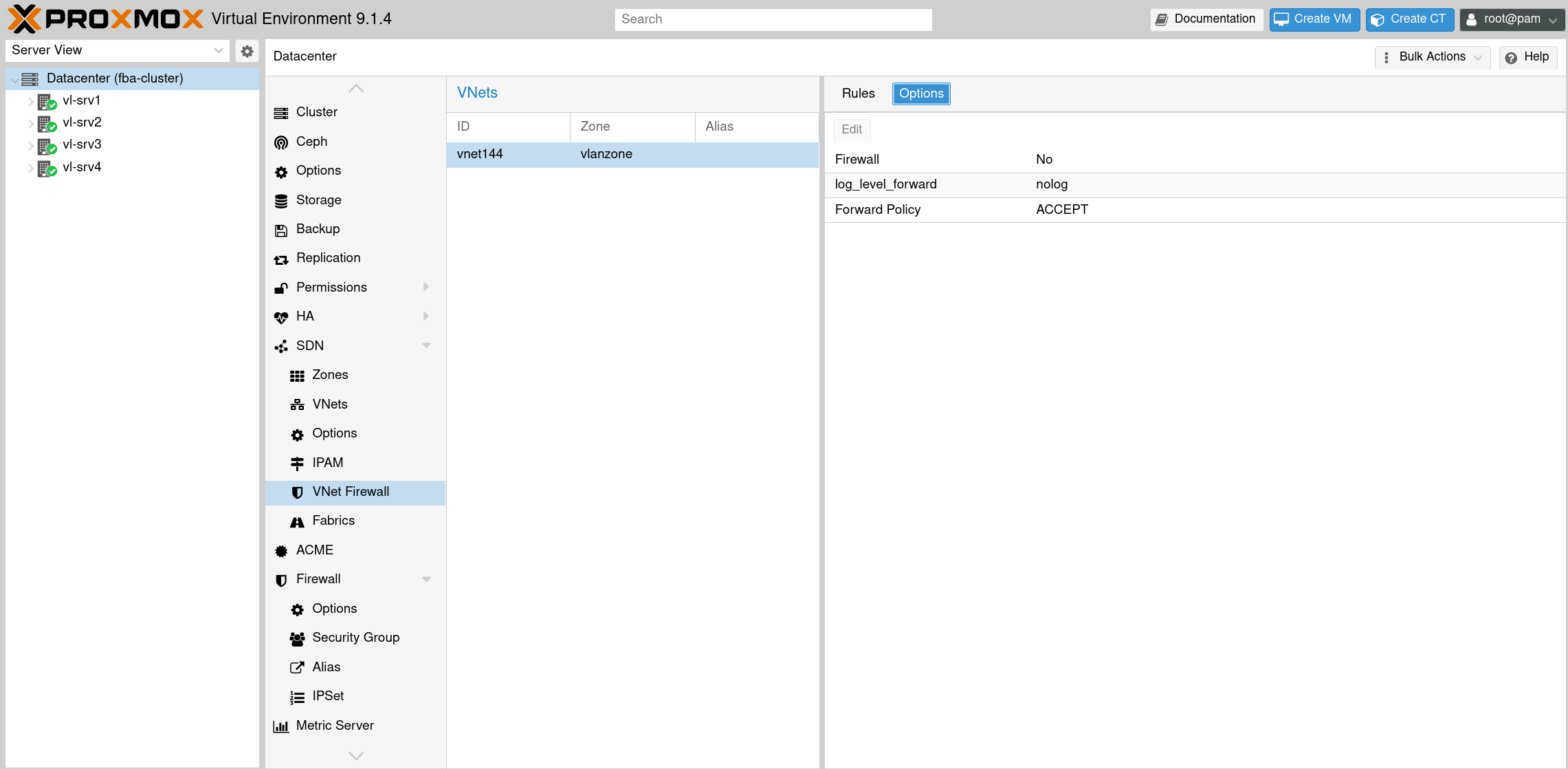
VNet firewall is disabled by default
Enable the firewall in the options tab and set the Forward Policy to DROP.
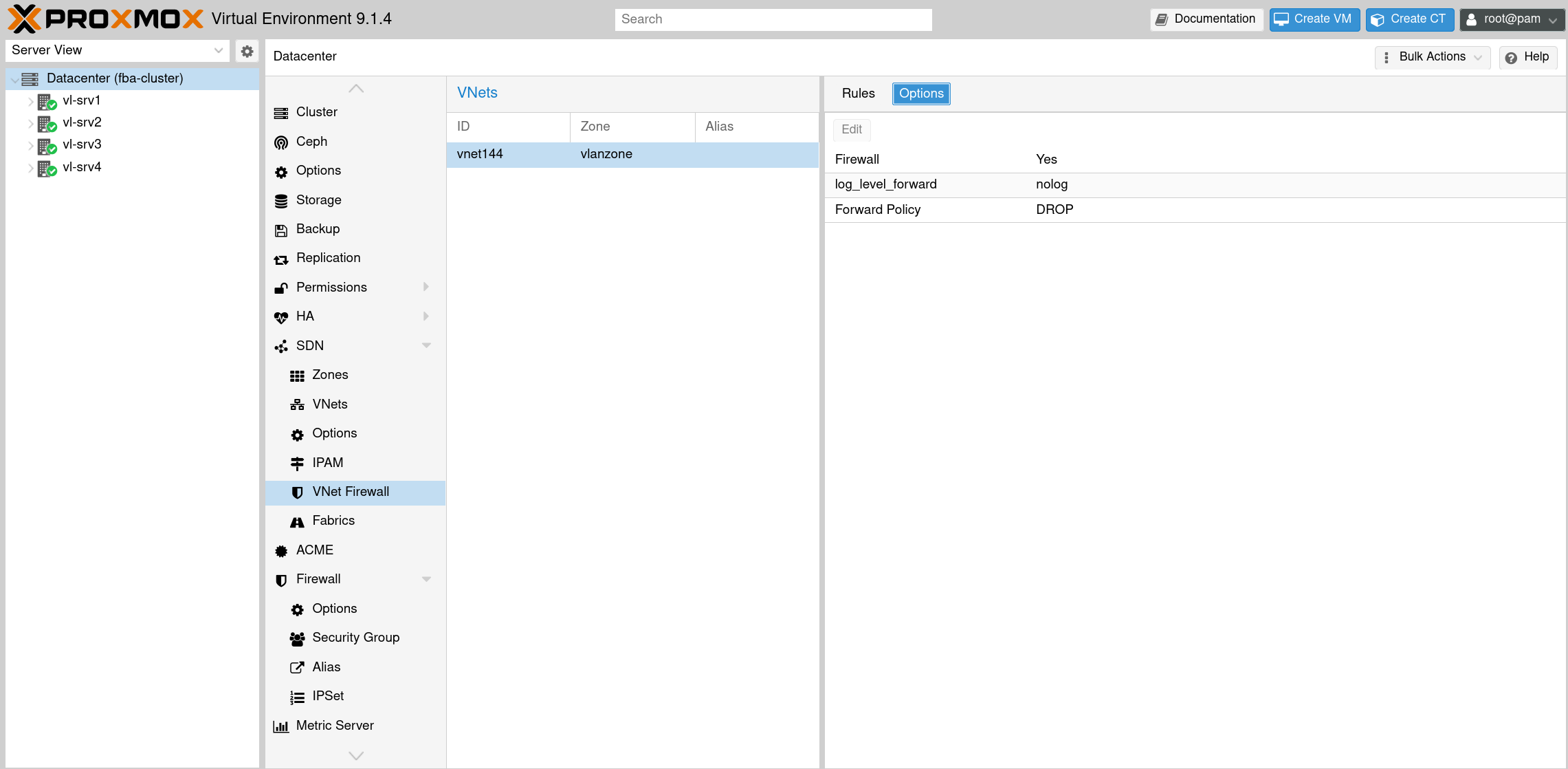
VNet firewall options
Create rules that allow traffic to and from the gateway while blocking VM-to-VM communication. The rules can be configured via the GUI or directly in the firewall configuration file /etc/pve/sdn/firewall/<vnet-name>.fw.
The rules below use IPSets like +sdn/vnet144-all and +sdn/vnet144-gateway, which are automatically created by Proxmox SDN based on the VNet and subnet configuration.
Required rules for microsegmentation:
FORWARD ACCEPT -source +sdn/vnet144-gateway -dest +sdn/vnet144-all -log nolog
FORWARD ACCEPT -source +sdn/vnet144-all -dest +sdn/vnet144-gateway -log nolog
Optional rules (DNS, DHCP, proxies, ICMP, depending on infrastructure and usecases):
# ICMP
FORWARD ACCEPT -dest +sdn/vnet144-all -p icmp -log nolog -icmp-type any
FORWARD ACCEPT -source +sdn/vnet144-all -p icmp -log nolog -icmp-type any

# Web proxy access
FORWARD ACCEPT -source +sdn/vnet144-all -dest dc/proxy -p tcp -dport 3128 -log nolog

# DNS
FORWARD DNS(ACCEPT) -source +sdn/vnet144-all -dest dc/dns -log nolog

# DHCP via relay on gateway
FORWARD ACCEPT -source +sdn/vnet144-all -dest +sdn/vnet144-gateway -p udp -sport 68 -dport 67 -log nolog
FORWARD ACCEPT -source +sdn/vnet144-gateway -dest +sdn/vnet144-all -p udp -sport 67 -dport 68 -log nolog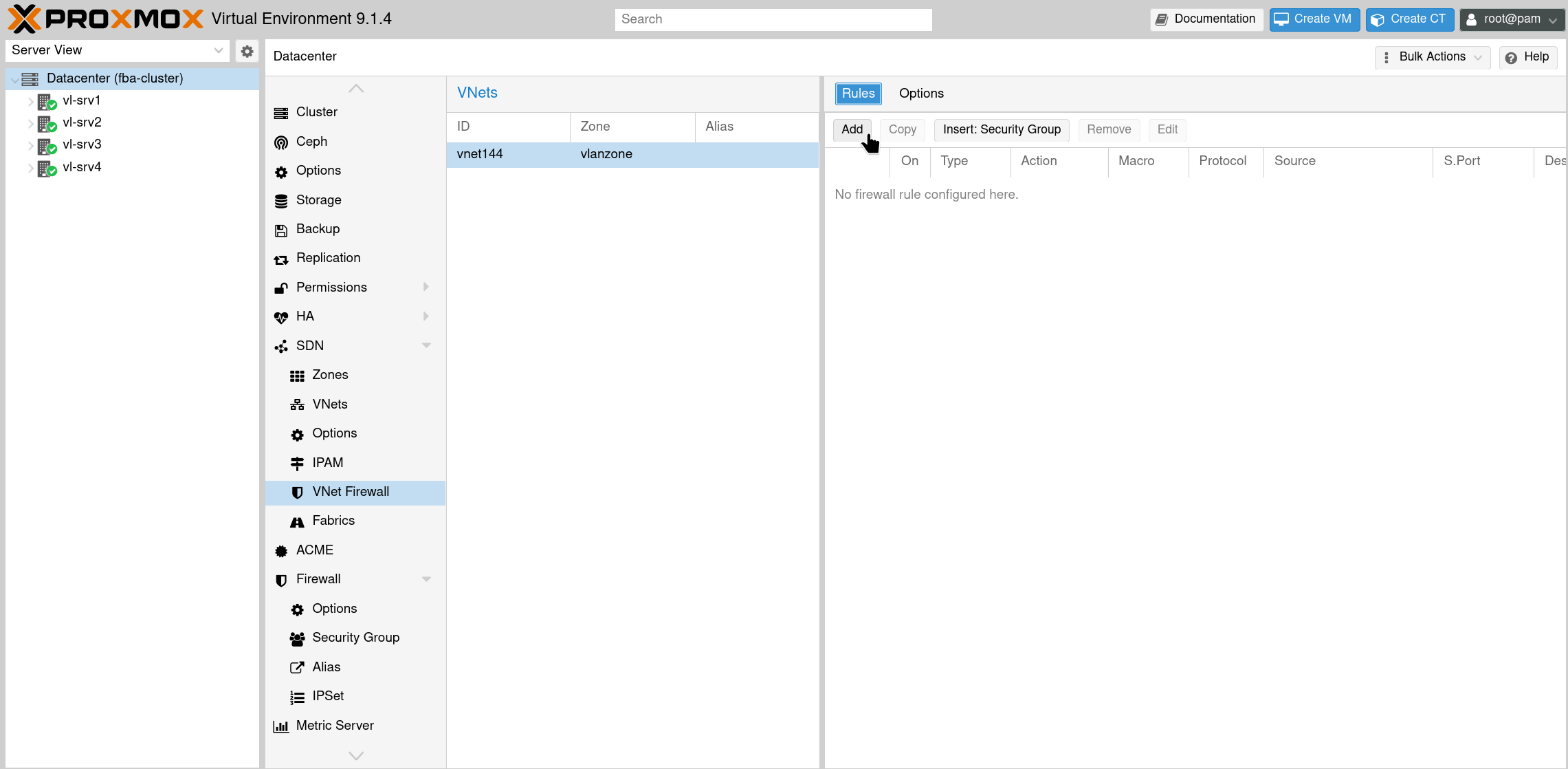
Add rules to the VNet firewall
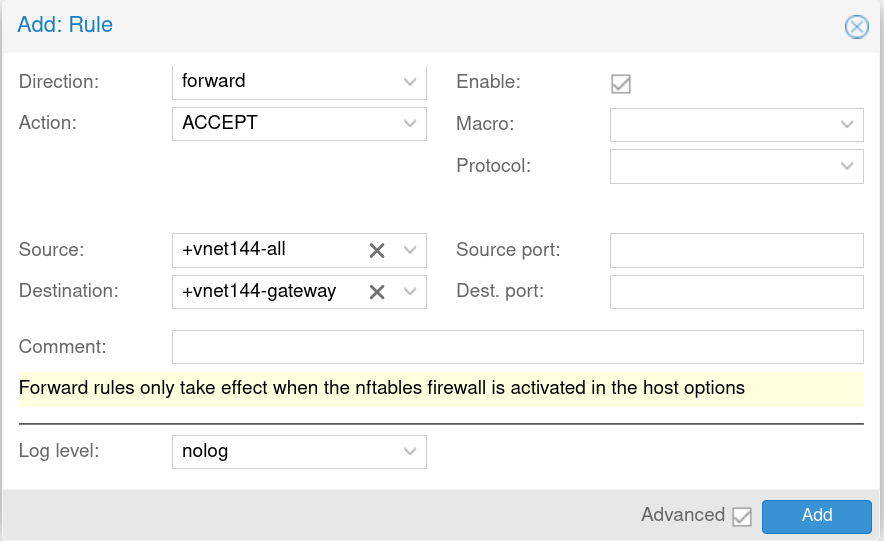
Example: Allow traffic from entire vnet to the gateway
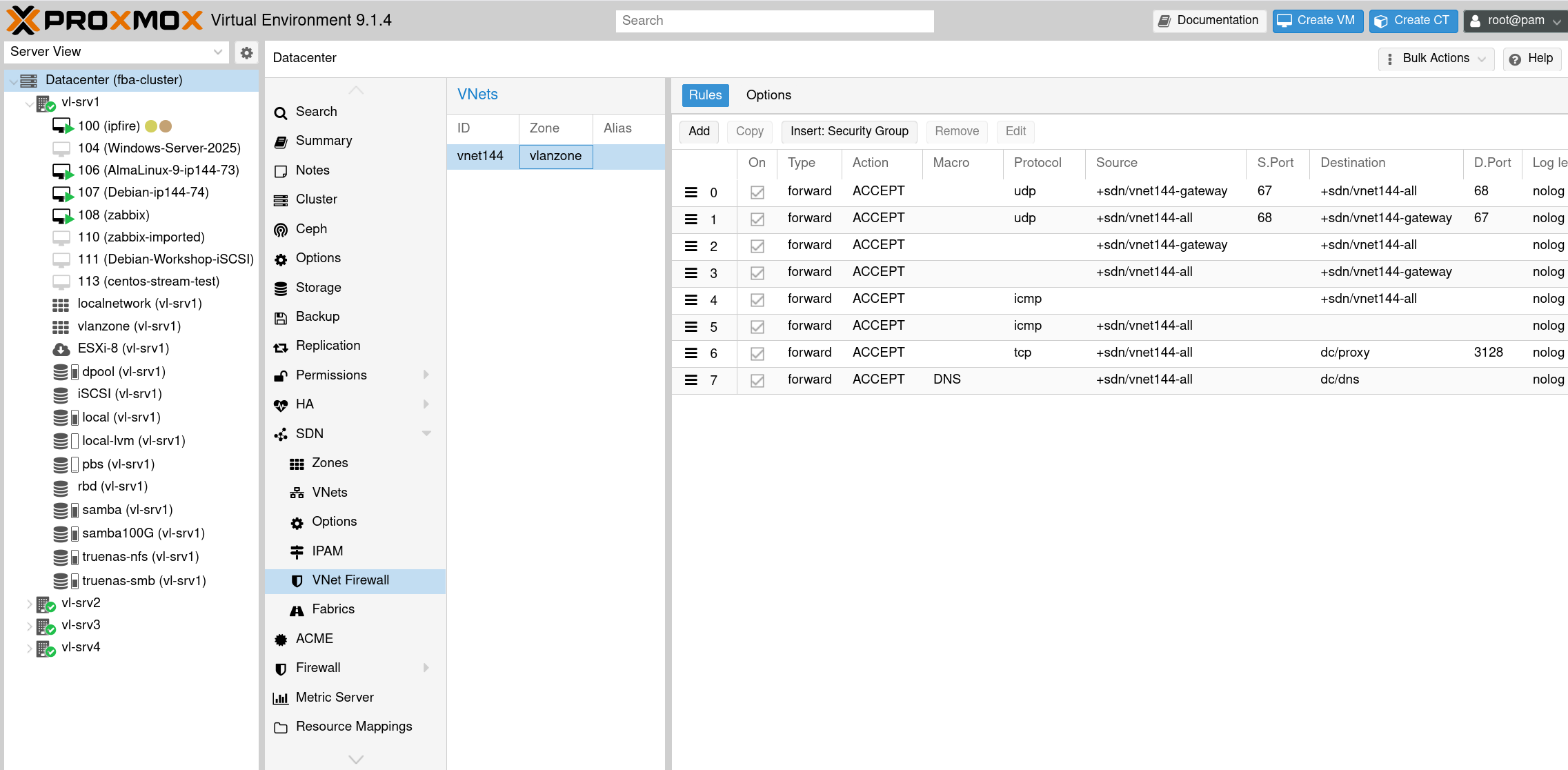
VNet firewall with added rules
3.3 Datacenter Firewall Prerequisites
The VNet firewall requires the datacenter firewall to be enabled. If management hosts are located outside the cluster network, rules allowing their access must be created before enabling the firewall.
Optionally, aliases and IPSets can simplify rule management when dealing with multiple gateways or networks, like in the VNet firewall rules, where dns and proxy are such aliases.
3.4 Layer 2 Isolation
With the current configuration, VMs connected to vnet144 and running on the same node cannot communicate with each other, as the Isolate Ports option is enabled on the VNet bridge. But this separation is only local, traffic leaving the host and being forwarded to another cluster node is not affected by this setting. Since the VNet firewall handles Layer 3 only, ARP traffic can still pass through. Nftables rules on the VNet bridge restrict ARP traffic to the gateway, preventing cross-host communication. Additionally, DHCP traffic is permitted to allow VMs to obtain IP addresses via a relay on the gateway, while preventing rogue DHCP servers from other VMs.
Create a configuration file /etc/pve/L2-microsegmentation.conf that maps VNets to their gateway IPs and MACs. Placing it in /etc/pve ensures automatic synchronization across all cluster nodes:
# Format: BRIDGE;GATEWAY_IP;GATEWAY_MAC
vnet144;172.31.144.1;aa:bb:cc:dd:ee:ff
The if-up.d script /etc/network/if-up.d/L2-microsegmentation-add applies nftables rules when a VNet interface comes up:
#!/bin/bash

[[ "$IFACE" != vnet* ]] && exit 0

CONFIG="/etc/pve/L2-microsegmentation.conf"
[ ! -f "$CONFIG" ] && exit 0

DATA=$(grep "^$IFACE;" "$CONFIG")
[ -z "$DATA" ] && exit 0

IFS=";" read -r BRIDGE GW_IP GW_MAC <<< "$DATA"
[ -z "$BRIDGE" ] && exit 0

TABLE="pve_microseg"
CHAIN="L2_ISO_${BRIDGE}"

# transaction shall be atomic
# so one long command is used
# 'add' if table/chain isn't there yet, 'flush' to have a fresh start with a re-run (ifup --force)
# low priority is used to ensure it is used early
NFT_CMDS="add table bridge $TABLE
add chain bridge $TABLE $CHAIN { type filter hook forward priority -10 ; policy accept ; }
flush chain bridge $TABLE $CHAIN
add rule bridge $TABLE $CHAIN ibrname $BRIDGE obrname $BRIDGE arp daddr ip $GW_IP accept
add rule bridge $TABLE $CHAIN ibrname $BRIDGE obrname $BRIDGE arp saddr ip $GW_IP accept
add rule bridge $TABLE $CHAIN ibrname $BRIDGE obrname $BRIDGE ip protocol udp udp dport 67 ether daddr ff:ff:ff:ff:ff:ff accept
add rule bridge $TABLE $CHAIN ibrname $BRIDGE obrname $BRIDGE ip protocol udp udp sport 67 ether saddr $GW_MAC accept
add rule bridge $TABLE $CHAIN ibrname $BRIDGE obrname $BRIDGE arp operation { request, reply } drop"

# execute the command
echo "$NFT_CMDS" | nft -f -

exit 0
The if-down.d script /etc/network/if-down.d/L2-microsegmentation-remove removes the rules when a VNet interface goes down:
#!/bin/bash

[[ "$IFACE" != vnet* ]] && exit 0

CONFIG="/etc/pve/L2-microsegmentation.conf"
[ ! -f "$CONFIG" ] && exit 0

DATA=$(grep "^$IFACE;" "$CONFIG")
[ -z "$DATA" ] && exit 0

IFS=";" read -r BRIDGE GW_IP GW_MAC <<< "$DATA"
[ -z "$BRIDGE" ] && exit 0

TABLE="pve_microseg"
CHAIN="L2_ISO_${BRIDGE}"

# remove specified chain, ignore errors (in case chain is already gone)
nft delete chain bridge $TABLE $CHAIN 2>/dev/null

exit 0
Deploy both scripts on all cluster nodes:
chmod +x /etc/network/if-up.d/L2-microsegmentation-add
chmod +x /etc/network/if-down.d/L2-microsegmentation-remove
The scripts integrate with Proxmox SDN via ifupdown2. When SDN changes are applied, the VNet interfaces are reloaded and the nftables rules are automatically applied. This also means that changes to the configuration file require the SDN to be reapplied.
3.5 Preventing IP Spoofing
The VNet firewall rules rely on IP addresses to identify VMs. Without additional measures, a compromised VM could change its IP address to bypass these rules or impersonate the gateway.
To prevent this, enable the VM firewall with IP filtering:
- Enable the firewall for the VM under Options - Firewall - Enable
- On the VM's network interface (Hardware - netX), tick the Firewall checkbox
- Enable the IP Filter option in the VM's firewall settings
- Create an IPSet named
ipfilter-net<X>(where X is the interface number, e.g.,ipfilter-net0) - Add the allowed IP address(es) to this IPSet
Limitations
The if-up.d and if-down.d scripts must be deployed manually or via automation tools like Ansible to all cluster nodes. The configuration file in /etc/pve is synchronized automatically. The solution assumes an external gateway handles routing between segments.
Alternative: EVPN Zones
This article uses VLAN zones for their simplicity and compatibility with external routing infrastructure. EVPN zones offer an alternative approach, with the advantage of supporting more than 4094 segments and direct VXLAN integration. The microsegmentation principles remain the same, but the nftables configuration differs due to the different bridge structure. This may be covered in a follow-up article.
Summary and Key Takeaways
This article presented a complete approach to implementing microsegmentation in Proxmox VE environments.
The Problem: Standard Proxmox VE configurations allow unrestricted Layer 2 and Layer 3 communication between VMs connected to the same bridge, enabling potential lateral movement by attackers.
The Solution: A three-layer approach combining SDN VLAN zones, VNet firewall, and nftables provides comprehensive isolation.
Key Takeaways:
- Layer 3 alone is insufficient. The Proxmox VNet firewall blocks IP traffic but does not prevent ARP-based discovery between VMs.
- SDN provides structure and local isolation. VLAN zones with the "Isolate Ports" option prevent VM communication on the same node, but not across cluster nodes.
- Additional nftables rules close the Layer 2 gap. By filtering ARP at the bridge level, VMs can only resolve the gateway address, not each other.
- Cluster-wide deployment is mandatory. Since VMs may run on any node, nftables rules must be present on all cluster members.
- Automation through ifupdown2 integration. The if-up.d scripts apply nftables rules automatically when SDN changes are applied, eliminating manual intervention.
- The solution integrates with external SDN. This approach is particularly effective when Proxmox VE connects to upstream controllers like Cisco ACI that handle inter-segment routing.
Sources
- Proxmox VE Firewall (Wiki): https://pve.proxmox.com/wiki/Firewall
- Proxmox VE Firewall (Manual): https://pve.proxmox.com/pve-docs-8/chapter-pve-firewall.html
- Proxmox VE SDN (Wiki): https://pve.proxmox.com/wiki/Setup_Simple_Zone_With_SNAT_and_DHCP
- Proxmox VE SDN (Manual): https://pve.proxmox.com/pve-docs/chapter-pvesdn.html
- Nftables (Manual): https://www.netfilter.org/projects/nftables/manpage.html