
Proxmox VE on ARM64: What Official Support Means for Your Storage Layer
On 5 August 2026, Proxmox released the first officially supported ARM64 edition of Proxmox Virtual Environment. Not a community build, not a technology preview, not a side branch. Same codebase, same repositories, same support lifecycle as the x86-64 version, including the pve-enterprise repo and paid subscriptions.
If you run virtualization on Debian-based infrastructure, this is one of the more consequential things to happen to the platform in a while. It is also easy to misread. Plenty of the early reaction treated it as “Proxmox on a Raspberry Pi,” which is close to the opposite of what actually shipped.
Here is what is in the release, what it does not do, and why the storage question turns out to be the interesting part.
What actually shipped
Proxmox VE 9.2 for ARM64 is built on Debian 13.5 “Trixie” with Linux 7.0, QEMU 11.0, LXC 7.0 and ZFS 2.4. Bare-metal ISO images and package repositories are both available.
Hardware support is deliberately narrow at the top tier:
- Fully supported: NVIDIA Grace Hopper and NVIDIA Vera platforms.
- Best effort: other UEFI-based ARMv9-A or newer systems. ARMv8-A generally works.
- Not supported: device-tree-only systems and legacy boot. Your board has to boot via UEFI and describe itself through ACPI.
That last requirement is why the Raspberry Pi is out. People have got it running with third-party UEFI firmware and a fair amount of manual work, but it is not a supported path and Proxmox says so plainly.
Feature parity was the stated goal, and Proxmox went out of its way to include storage in that claim. From CTO Thomas Lamprecht:
Our goal was not simply to run Proxmox VE on a new architecture, but to deliver full feature parity: KVM, networking, clustering, ZFS, and Ceph all behaving exactly as our users expect from our x86-64 builds.
Why NVIDIA Grace, and why that tells you the whole story
Development happened in collaboration with NVIDIA and Supermicro, and validation ran on Grace Hopper systems in production. NVIDIA sponsored the work in part for its Mission Control AI infrastructure management product.
Read the hardware list again with that in mind. A Grace Hopper node is not a low-power edge device. It is an AI host with an ARM CPU welded to the memory-coherent path of a GPU. The organizations buying racks of those machines already run Proxmox for everything else, and they were being told to manage the AI fleet with a separate toolchain. That gap is what closed on 5 August.
The second driver is the boring one that actually pays for itself. COO Tim Marx put it as data centers shifting toward “high-density, energy-efficient architectures” while needing the same mission-critical stability they get on x86. Anyone who has priced a rack recently against its power and cooling envelope knows why performance per watt has stopped being a slide and started being a line item.
The limitations that change how you design a cluster
This is the section most of the coverage skipped, and it is the part that affects your architecture:
- Live migration only works between nodes of the same architecture. Obvious in hindsight, but it constrains your HA design.
- There is no official support for mixed-architecture clusters. You can join nodes of different architectures in theory. You should not plan a production cluster around it.
- VMs boot exclusively via UEFI (AAVMF). SeaBIOS is not available. Any template or appliance image that assumes legacy BIOS needs rework.
- No AMD SEV, no Intel GVT-g mediated vGPUs. Confidential computing and mediated GPU splitting look different here.
- No OS-level CPU microcode packages. Firmware updates come from the vendor.
And the one nobody lists because it feels too obvious to say: your guests have to be ARM64 guests. Your x86 VM does not move to this cluster. Its operating system, its agents, its licensed application binaries and its backup client all need aarch64 builds.
Put those together and the practical conclusion is clear enough. For now, an ARM64 Proxmox deployment is its own cluster and its own HA domain. It sits next to your x86 estate, not inside it.
Which makes storage the thing that has to span both
Here is the part worth thinking about carefully.
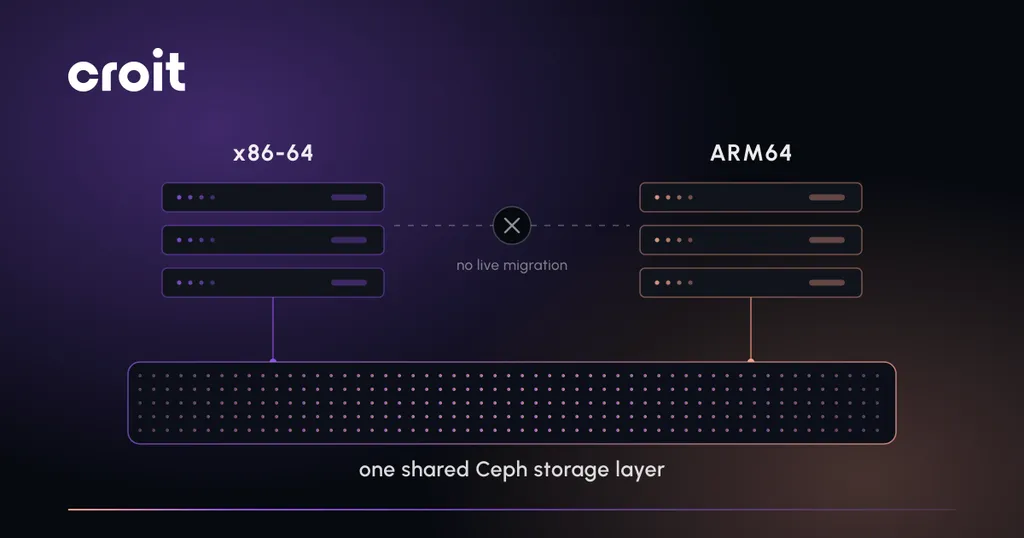
If compute cannot cross the architecture boundary, and it cannot, then the only layer that can hold a split estate together is storage. That reframes the problem. The question stops being “do I migrate to ARM” and becomes “what does my ARM cluster and my x86 cluster have in common.”
Shared, software-defined block and file storage answers that. Point both clusters at the same Ceph cluster over RBD and you get one capacity pool, one snapshot and backup process, one DR story, one monitoring surface. VMs still cannot live-migrate between architectures, but the disks live in one place and the operational model does not fork in two.
The alternative, which is where a lot of teams will drift by default, is local ZFS on both sides. That works fine and ZFS 2.4 is in the release. It also means your ARM64 pilot becomes an operational island with its own capacity planning, its own backup targets and its own failure domain. Two years later you have two of everything.
Ceph on ARM64: where things actually stand
The good news is that this is not new ground. Ceph has been building for aarch64 for years and the code has NEON-optimized paths for the parts that matter.
Commercially, the ecosystem moved ahead of Proxmox. IBM and Red Hat began supporting arm64 client tooling in June 2025 and set full commercial support for Ceph clusters on arm64 for the end of that year, with Ampere supplying arm64 hardware to the Ceph Community Lab. Ampere’s own framing for why: “energy efficiency and performance-per-watt and iops-per-watt are driving adoption.”
The rough edge is orchestration rather than Ceph itself. As Redouane Kachach noted on the ceph-users list in September 2025, “cephadm doesn’t support multi-arch clusters at the moment.” Ceph’s own data path does not really care what instruction set an OSD runs on. CRUSH has no concept of architecture, and OSDs are independent processes. Deploying and maintaining a cluster whose nodes are not all the same architecture is where the standard tooling gets in your way, because it wants one container image and one package set.
So if you are planning this, the questions to answer are:
- Can your deployment tooling serve different node images per architecture, or does it assume one?
- Are you running the same Ceph release everywhere? Version skew across a mixed-arch cluster is not a place you want to be during an upgrade.
- Have you measured, not assumed, the per-core behaviour of checksumming, compression and erasure coding on your specific ARM silicon? These are the SIMD-heavy paths. Results vary more between ARM implementations than people expect.
- What are your recovery and backfill characteristics under load on that hardware?
How we handle mixed architectures at croit
We have been building ARM64 node images since 2018, originally flagged as a preview for test clusters. In release v2404.1 we added the ability to select separate default OS images for x86_64 and ARM nodes on clusters running mixed architectures, which is the practical piece: architecture becomes a property of the individual node rather than something that forks your whole deployment workflow. Nodes PXE boot an immutable image we serve, so adding an ARM node to an existing cluster does not mean maintaining a second install process. Worth noting for anyone planning an all-ARM rack: our management container currently runs on x86-64, so the management node itself stays on x86 for now.
On the hypervisor side we are a Proxmox Gold Partner and the RBD integration between a croit-managed Ceph cluster and Proxmox VE is documented and in production at customer sites. Whether you use our platform or plain cephadm, the design principle is the same: keep the storage layer common and let the compute tiers differ.
If you are evaluating ARM64 for real
A short list of things to settle before you buy hardware:
- Guest OS and application inventory. Which of your workloads have aarch64 builds today, with vendor support, not just “it compiles.”
- Licensing. Some vendors license per core and some price ARM differently. Check before you size.
- Templates and images. UEFI-only means auditing your golden images.
- Agents. Backup client, monitoring agent, config management, security tooling. Each one needs an ARM64 build or your operational tooling has a hole in it.
- Storage plan. Shared Ceph, or local ZFS with a deliberate decision to run an island. Pick on purpose.
- A power baseline you actually measured. The efficiency case is the main commercial argument for ARM. Measure your current watts per usable TB and per VM before the pilot, or you will have no way to prove the thing you bought it for.
- Support coverage on the specific platform. Proxmox enterprise subscriptions for arm64 are available on request rather than off the shelf, so ask early.
The honest summary
Proxmox VE on ARM64 is a real product release, aimed squarely at high-density and AI infrastructure, on a narrow but important hardware list. It is not a homelab story and it is not yet a drop-in extension of your existing cluster.
What does change is that ARM64 is now a legitimate option for a production virtualization tier with a commercial support path behind it. If that tier arrives in your data center, it will arrive as a second island unless you have already decided what the two islands share. In practice, that shared thing is the storage layer, and deciding it now is considerably cheaper than deciding it after the second cluster is full.
Planning an ARM64 tier?
croit runs mixed-architecture Ceph clusters from one management plane, with separate default OS images per node architecture. We are a Proxmox Gold Partner and the RBD integration is in production at customer sites - talk to our engineers before you buy the hardware, not after the second cluster is full.