
Ceph multi-cluster management with croit Datacenter Manager
By Andrei Khomiakov
croit Datacenter Manager (CDM) is croit's tool for Ceph multi-cluster management. It brings health, capacity, findings, logs and S3 multisite status from all your croit and native Ceph clusters into one interface. The first release shipped together with croit v2610.0 in October 2026.
If you run more than one cluster, the daily check is the same routine on each of them: open the dashboard, check health, check capacity, look for anything that needs attention. With every new cluster it gets harder to see which problem to handle first. CDM gives you one view of the whole fleet and a short path to the cluster that needs you.
See which clusters need attention
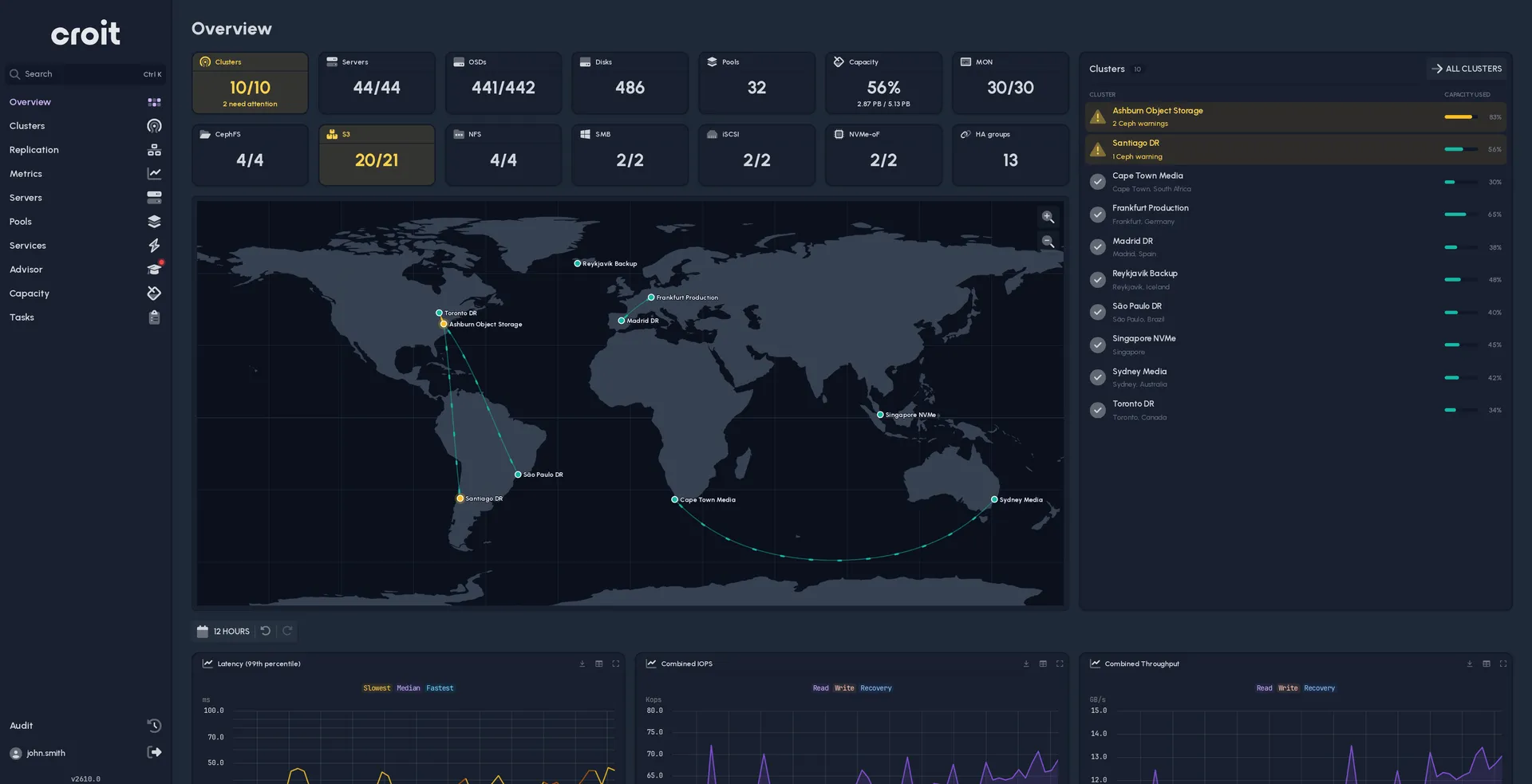
The overview combines health, capacity, throughput and IOPS for every connected cluster. A world map shows each cluster at its location, colored by health, and the cluster list puts the systems with problems first.
Missing data stays visible. CDM marks a cluster it cannot reach as unreachable and leaves it out of the totals, so it never shows up as an empty or idle cluster. Fleet totals say how many clusters they cover, for example "over 5 of 6 clusters", so you always know when you are looking at a partial picture.
Follow a warning to its source
Advisor collects findings from all clusters into one list, sorted by severity: Ceph health checks, croit recommendations, failed disks, down OSDs, unreachable clusters and croit clusters that run an outdated release. Admins can mute findings they have accepted.
Fleet-wide tables let you search servers, services, OSDs, pools, HA groups and tasks across every cluster, without opening each dashboard. For croit clusters you also get physical disks with SMART health, performance charts, and logs in two modes: a live tail, or a time range of up to 24 hours. From a warning you go to the affected server or OSD, check its metrics and logs, and then open the cluster's own interface with Open UI to fix it.
When you need help, any CDM user can open a croit support ticket for a licensed croit cluster directly from CDM, with the cluster's debug information attached. Admins also get an audit view that combines CDM's own activity with the audit entries of the connected clusters.
Plan capacity before it runs out
A percentage-used figure tells you how full a cluster is today. For planning you need the trend.
For croit clusters, CDM forecasts, per device class, how many days are left until the fullest OSD reaches the cluster's nearfull and full ratio. This matters because a cluster-wide average can hide one OSD or one device class that fills much faster than the rest. The Capacity view also names the cluster that is next to fill.
Forecasts need at least seven days of history and use up to 30 days. When you add a croit cluster, CDM imports the last month of metrics from it, so forecasts are usually there from the start. Treat them as planning estimates: workload changes, rebalancing or new hardware change the forecast.
Manage S3 multisite replication from one place
For licensed croit clusters, CDM shows every S3 multisite realm and zone group with its primary and secondary sites, and the metadata and data sync status of each secondary. It tells a site that is still catching up apart from a site that has not reported for five minutes.
With write access, CDM admins can also set up a new multisite realm, add secondary sites and change the primary:
- Switch over while the primary is online, for planned maintenance.
- Fail over to an in-sync secondary when the primary has been silent for five minutes.
- Fail back when the former primary returns.
Write access needs a croit cluster, an administrator credential, a valid croit license and a croit version that supports the operation. Before setup, CDM checks cluster compatibility, zone names and whether the gateway servers can reach the primary. Plan this step carefully: once a cluster is a primary, it cannot leave multisite again.
These actions change your clusters. A site that is behind loses the writes it has not received yet when it takes over, so CDM shows the sync state and asks for explicit confirmation first. Clusters added with read access are never changed by CDM.
croit clusters and native Ceph clusters
croit clusters from v2604 on get every CDM feature, S3 multisite needs a croit license. Native Ceph clusters connect through the Ceph Manager dashboard API with a read-only dashboard user. They get health, capacity, inventory, logs and Ceph health checks in Advisor from day one. Some features depend on data the Ceph API does not provide, and some need a croit license:
| Native Ceph | croit | croit, licensed | |
|---|---|---|---|
| Health, capacity, servers, OSDs, pools, services | ✓ | ✓ | ✓ |
| Disks and SMART, HA groups, charts | – | ✓ | ✓ |
| Capacity forecast | – | ✓ | ✓ |
| Findings | Ceph health checks | croit advisor | croit advisor |
| Logs | Latest entries | ✓ | ✓ |
| Configuration | Ceph options | ✓ | ✓ |
| Task history and output | – | ✓ | ✓ |
| RBD mirroring status | – | ✓ | ✓ |
| S3 multisite status | – | – | ✓ |
| Changes from CDM1 | – | – | ✓ |
| Open the cluster's own UI | Ceph dashboard | croit, read-only | croit, read-only |
| Support | Paid emergency support | Paid emergency support | Included, tickets from CDM |
1 Cluster actions, configuration changes, advisor mutes and replication setup, for CDM users with write access.
When a feature is not available for a cluster, CDM says so. It does not show an empty result.
Deploy it next to your clusters
CDM runs as a single container next to your clusters and is self-hosted, so cluster data stays in your environment. It reads the clusters through their existing APIs. There is no agent on the storage nodes.
You need:
- a linux/amd64 host with Docker that your users can reach
- network access from that host to each cluster's API (self-signed certificates work)
- an OpenID Connect identity provider such as Keycloak, authentik, Entra ID, Okta or Google Workspace, because CDM has no passwords of its own
- a read-only API token or user for each croit cluster, or a read-only dashboard user for each Ceph cluster
Generate a secret key once and protect it:
openssl rand -hex 32 > cdm-secret-key
chmod 600 cdm-secret-key
Then start CDM. It serves plain HTTP on port 8234, so put it behind your TLS reverse proxy and set CDM_PUBLIC_URL to the HTTPS address your users open:
docker run -d --name cdm -p 8234:8234 -v cdm-data:/data \
  -e CDM_PUBLIC_URL=https://cdm.example.com \
  -e CDM_SECRET_KEY="$(cat cdm-secret-key)" \
  -e OIDC_DISCOVERY_URL=https://id.example.com/.well-known/openid-configuration \
  -e OIDC_CLIENT_ID=cdm \
  -e OIDC_CLIENT_SECRET=... \
  oci.croit.io/croit/cdm:latest
Everyone who signs in is a viewer by default. Map identity provider groups to the admin role with OIDC_ROLE_MAPPING. Back up the secret key: CDM encrypts all stored cluster credentials with it. A new installation comes with four demo clusters, so your team can explore the interface before you connect real systems. The full steps are in the installation guide.
See your clusters on one map
Tell us how many clusters you run and where, and we show you CDM on a setup like yours.