
croit has an MCP server: connect your own AI agent
Starting with v2611.0, your croit installation offers an MCP server. MCP (the Model Context Protocol) is the open standard AI agents use to work with other software. With it, an agent such as Claude Code, Claude Desktop, opencode or pi can read your Ceph cluster's state and operate it through croit.
What an agent can do
The agent reaches croit's whole API, the same one the croit UI uses: servers, disks and OSDs, pools, S3, CephFS, NFS, SMB, NVMe-oF, settings, tasks and the rest. Ask it which OSDs are fullest, why a server shows as offline, or to create a pool with a given rule, and it finds the operations that answer the question and calls them.
croit's API has over 600 operations. Offering each one as its own tool would swamp the agent's choice, so croit offers four instead:
- find_operations searches the API by what an operation does.
- describe_operation returns its parameters and answer.
- call_read_operation calls read endpoints (most GET endpoints), with secrets masked.
- call_sensitive_operation calls all other endpoints, and read endpoints whose answer is a secret.
The agent searches, reads the description, then calls. Answers that run long are cut with a hint telling the agent to filter or page, so a large cluster doesn't flood its context.
Your token decides what the agent may do
An agent connects with a croit API token, and croit checks every call against that token's roles. Nothing about MCP widens them:
- A token with only the Viewer role keeps the agent read-only. Give it Admin only if the agent should change the cluster.
- Every call runs through the same code as a direct API request, with the same role checks, validation and license checks.
- The audit log records every change under the token's user, marked as made through MCP.
Secret fields in an answer, such as a password next to a user name, stay masked when the agent reads them. Only the sensitive tool returns them whole.
Sensitive operations can destroy data
call_sensitive_operation runs anything an admin can do in croit: deleting a pool, destroying an OSD, wiping a disk. An agent that calls the wrong operation, or the right one on the wrong pool, can cause data loss that no undo brings back.
croit marks this tool as destructive, using MCP's own hint for it. Whether the agent then asks you before each call is up to the agent's harness, not croit: most harnesses let you allow a tool once and for good, and some run every tool without asking. Claude Code in auto mode, for example, tends not to ask for permission.
Since this is outside croit's control, before you give an agent an Admin token:
- Check how your harness handles a tool marked destructive, and keep it asking.
- Read every sensitive call before you allow it, the operation and its arguments both.
- Prefer a Viewer token for diagnosis, and create an Admin token only for the task that needs one.
Depending on what you use, you may also be able to switch off this one tool in your agent's MCP settings.
Where your data goes
Whatever the agent reads goes to the model behind the agent. That's your agent's AI provider, not croit, so the provider's terms apply to your cluster data. Choose the agent and the token's roles with that in mind.
If your cluster data should stay with croit, use the AI assistant built into the croit UI instead. Its model runs on croit's own hardware, and every change it proposes waits for your approval.
How to use the croit MCP server
- In the croit UI, open Croit > API Tokens, create a token with the roles the agent needs, and copy it.
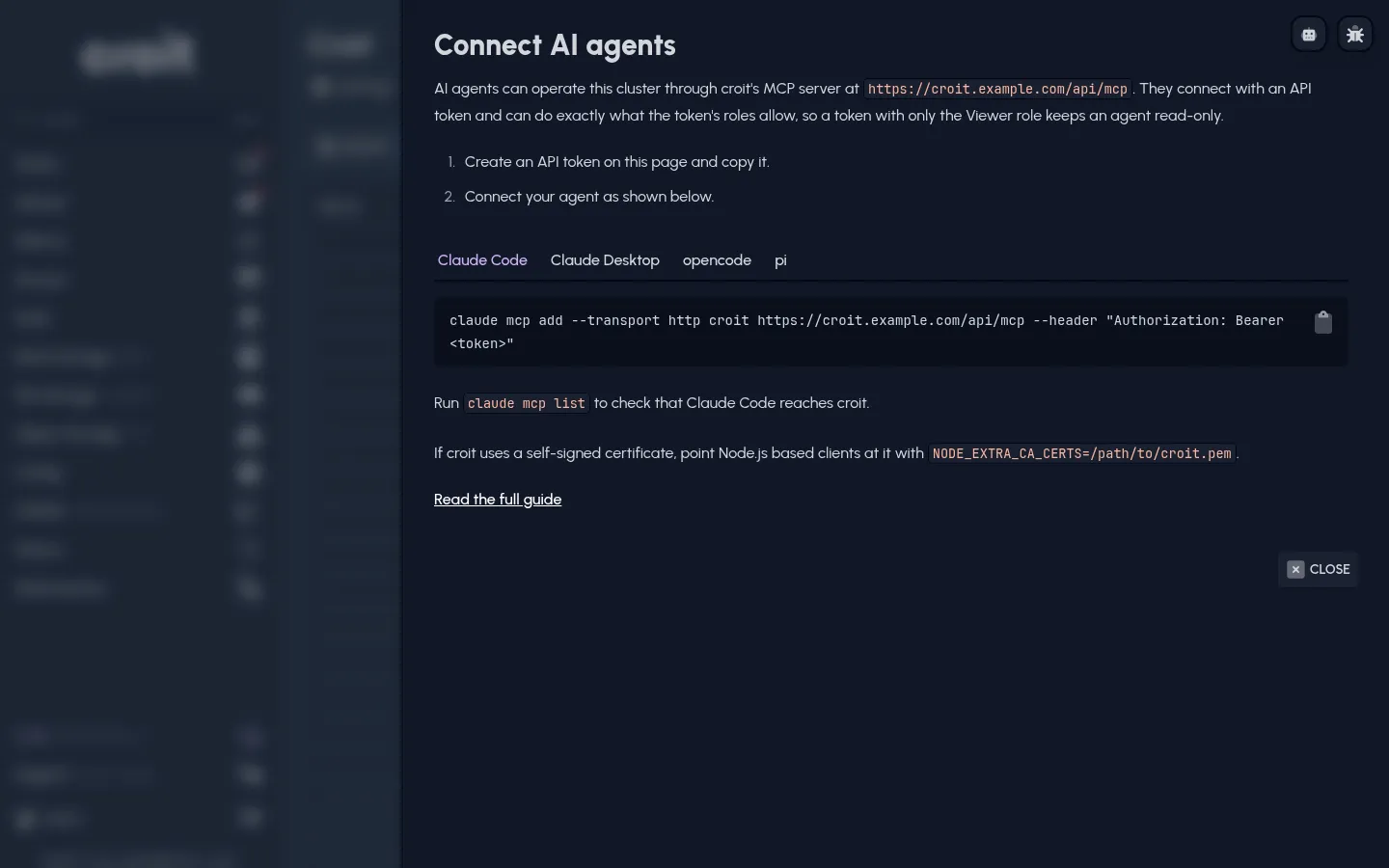
- Click Connect AI agents on the same page. It shows the setup steps for several popular agents, with your croit's address already filled in, and what to do when croit uses a self-signed certificate.
For Claude Code, for example, that's one command:
claude mcp add --transport http croit https://<your-croit>/api/mcp \
  --header "Authorization: Bearer <token>"
Any other client that speaks MCP's Streamable HTTP transport works the same way.
Once your agent is connected, go ahead and ask it about your croit cluster. Some ideas to start with:
- What is the current status of my cluster?
- Why is Ceph unhealthy?
- Can you resolve all the warnings croit shows for this cluster?
- Why did this Ceph daemon crash?
- I replaced the disk in slot 4 on server storage-07. Can you recreate the OSD for it?
Switching it off
The MCP server is on by default. You can switch it off for the whole installation with the croit enable mcp setting, and every agent is refused from the next request on.
24/7 premium support
Running croit in production? Our team is available around the clock to help with upgrades, capacity planning and incidents.