
croit Datacenter Manager v2611.0: RBD mirroring, fleet configuration and cluster actions
croit Datacenter Manager (CDM) shows all your croit and Ceph clusters on one screen. With v2611.0 it does more than show them: it sets up RBD mirroring between croit clusters, compares and changes cluster settings across the fleet, and lets admins restart services and reboot servers without opening each cluster's own interface. The release notes carry the full list of changes.
RBD mirroring between croit clusters
RBD mirroring keeps a copy of your block devices, such as virtual machine disks, on a second Ceph cluster. When the first cluster fails, the copy takes over. CDM v2611.0 sets it up between two croit clusters and watches it afterwards.
A wizard walks you through the setup: pick the source pool, choose one-way or two-way mirroring, pick the images, then the target cluster. CDM creates a missing target pool and the rbd-mirror daemon that copies the images, runs its checks on both clusters and shows you what it is about to do before it starts.
- One-way or two-way. One-way keeps a standby copy on the target. Two-way lets each cluster copy its own images to the other.
- Snapshots or journaling. Snapshot mirroring copies changes at a set interval and keeps writes fast. Journaling copies every write as it happens, at the cost of slower writes.
- State at a glance. The replication view shows each pair with its direction, how many images are in sync and the largest lag. The fleet map shows the same on the line between two clusters.
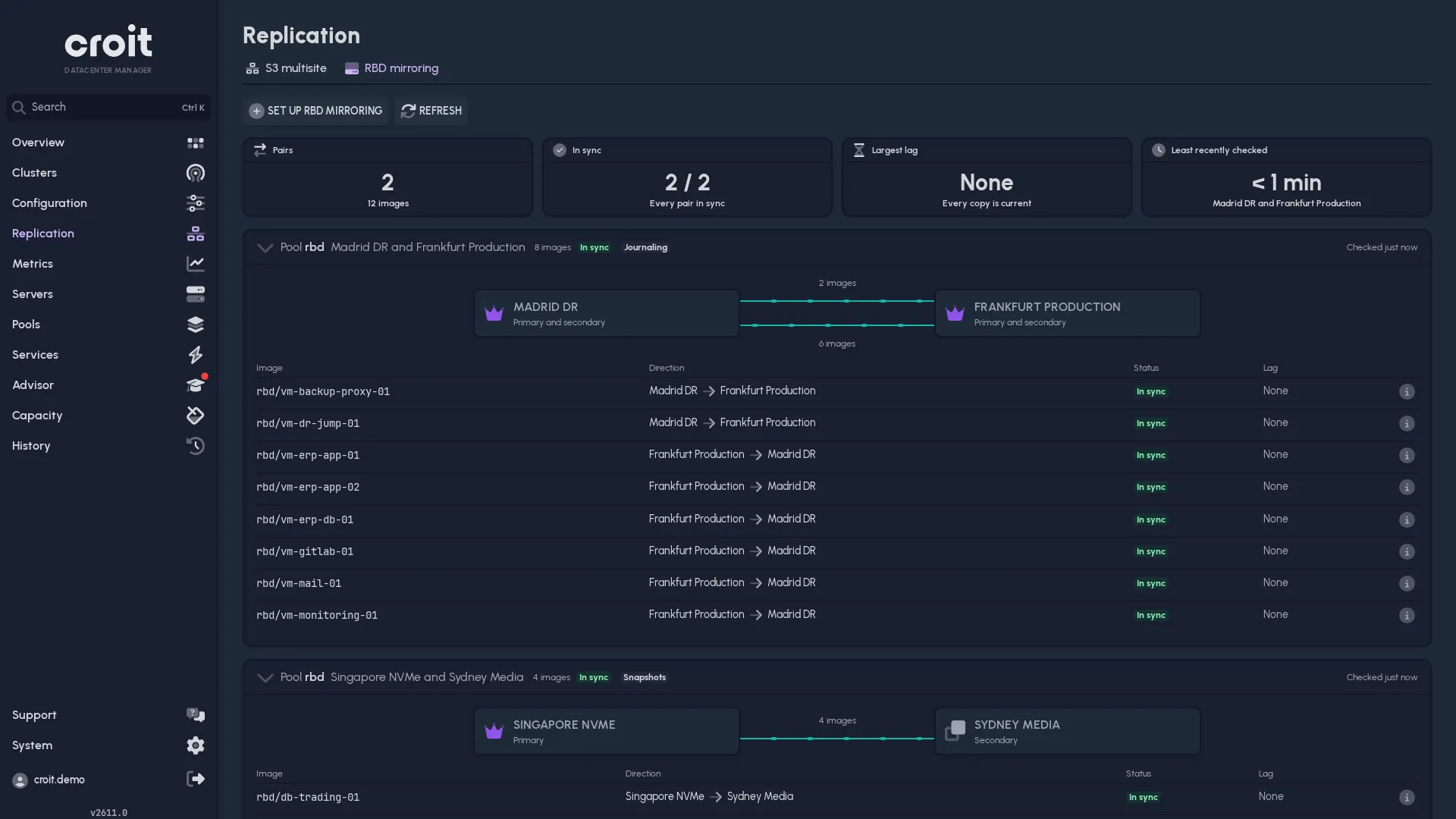
From an image's details you can switch over, demote, promote or fail over. A failover loses the writes that hadn't reached the copy yet, so fence the old primary first. When the old primary comes back, you resynchronize it with Ceph's own procedure.
Learn more about RBD mirroring →
Configuration across clusters
Clusters drift apart. One has had a different recovery speed since an incident, another kept noout after maintenance, a third tuned an option nobody remembers. The new Configuration page shows the settings of all your clusters side by side, one column per cluster, and highlights what differs.
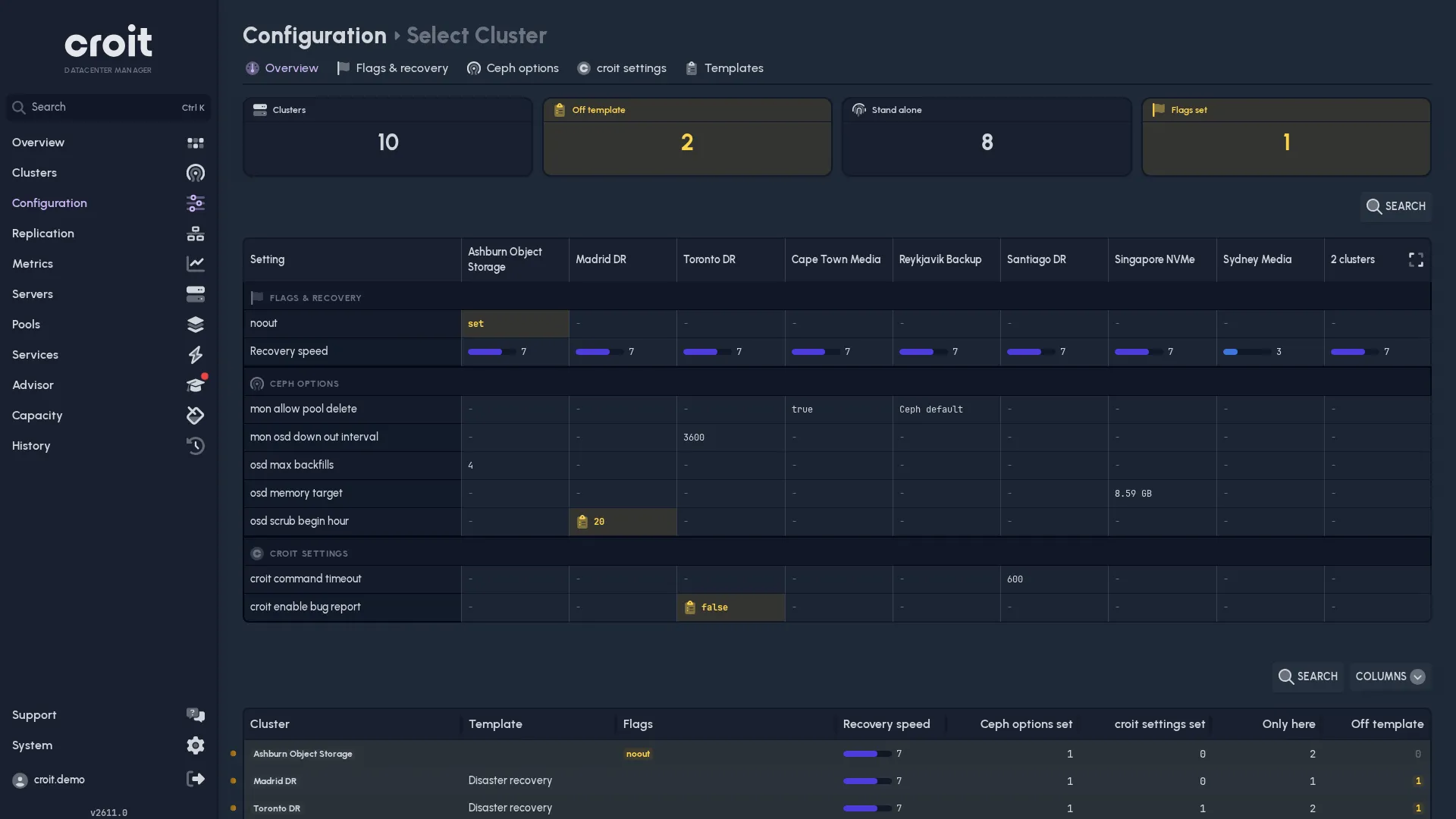
You can change a setting on one cluster or on many at once: pick the clusters, set the value, and review the change per cluster before you apply it. If one cluster refuses, the others are still changed, and the audit trail records the result for each.
Templates describe the values your clusters should have, for all clusters or a selected few. CDM leaves your clusters alone and marks the ones that differ from their template. Bring in line sets them back once you choose to.
Learn more about fleet configuration →
Restart, reboot and mute from the fleet views
Admins can now act on what they see. Select services or OSDs to start, stop or restart them, select servers to reboot them, and mute health checks on a cluster's page. Restarts and reboots of several rows run one after another or all at once, as you choose.
Try it in a minute
A new demo login lets you try CDM on a demo fleet, without an identity provider or a cluster of your own.
If you already run CDM: without the demo login, updating removes the demo clusters unless you set CDM_DEMO_CLUSTER=on. Your own clusters stay.
Safer updates
Before an update changes CDM's database, CDM keeps a copy of it. If you need to go back to the previous release, you restore that copy and start the older image. After an update, a What's New? dialog shows the release notes you haven't seen yet.
The CDM image now also runs natively on ARM hosts (linux/arm64).
Security updates
v2611.0 updates third-party components of CDM to fix known vulnerabilities.
Also in this release
- The Advisor's findings can be refreshed, and a finding can be muted on the croit cluster itself.
- A cluster's page charts the used space and fill level of each of its device classes.
- Plain Ceph clusters and croit clusters without a license can request croit's paid emergency support.
- For croit clusters, the audit trail marks changes made through croit's MCP server.
- The overview's Servers, OSDs and Disks tiles change color when something is down.
- System → Dependencies lists the third-party components CDM contains and their licenses.
- Log lines can be copied from the log viewer, and Tail mode follows new lines again.
24/7 premium support
Running croit in production? Our team is available around the clock to help with upgrades, capacity planning and incidents.