
Documentation
- Getting Started Configuration Using CDM
- Clusters
- Fleet Configuration
- Capacity
- Metrics
- Servers, Pools and Services
- Logs
- Advisor
- Tasks and Audit
- S3 Multisite
- RBD Mirroring
- Support
On this Page:
RBD Mirroring
Replication → RBD mirroring shows which clusters copy RBD images to each other.
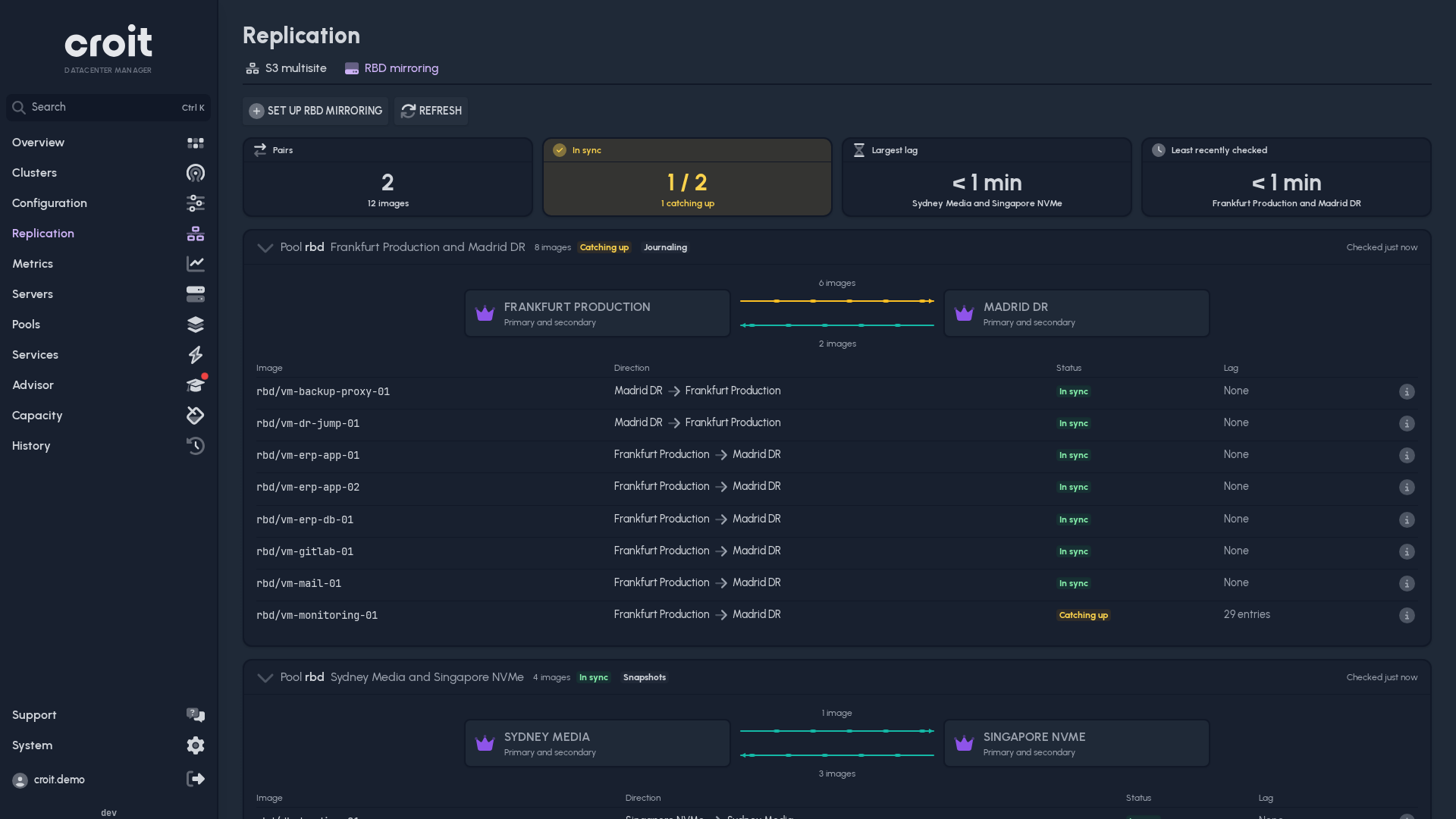
Each card is one pair of clusters. The crown marks the cluster that holds the primary images. Pulses run along the line the way the images flow, and the line says how many take that way. A pair that mirrors both ways has pulses in each direction.
- The tiles at the top count the pairs, show how many are in sync, the largest lag and when CDM last read a pair. A tile that needs attention leads to its pair.
- The table lists each image with its direction, state and lag.
- i opens an image's details: both copies with their role, state and report times, and the role actions.
| State | |
|---|---|
| In sync | the copy is current, or up to one and a half snapshot intervals behind |
| Copying | the first copy is still being made |
| Catching up | the copy is further behind than usual |
| Warning | a pool reports a mirroring warning |
| Replication error | an image or pool reports a failure |
| Not reporting | CDM cannot read the pair right now |
Snapshot mirroring copies the newest snapshot once it exists, so a copy is normally up to one snapshot interval behind.
The fleet map shows RBD mirroring on the line between two clusters. Its popover shows each direction with how many images are in sync.
Setup
Set up RBD mirroring connects a pool on one cluster to another cluster. Both need write access.
- Source: the cluster and pool to copy. Pools that already mirror are listed but cannot be picked.
- Mode:
- One-way keeps a copy on the target that can take over. Two-way lets each cluster copy its own images to the other.
- Snapshots copy changes at a set interval and keep writes fast. Journaling copies every write as it happens, but slows writes, and the Linux kernel client cannot open journaled images.
- Images: the images to copy. With journaling you can mirror the whole pool instead.
- Target: the receiving cluster. Images already in its pool stay there, but none may have the name of an image you copy. When you mirror the whole pool, its journaled images become mirrored too: in two-way mirroring they are copied to the source cluster. CDM creates a missing pool with the source pool's settings, which you can change.
- rbd-mirror: the daemon that copies the images. The receiving cluster needs one; pick the servers to run it on if none runs yet.
- Review: what CDM is about to do, and the checks it ran on both clusters.
A pool mirrors with one other cluster. The rbd-mirror servers must reach the other cluster's monitors and OSDs.
The setup runs as a task; Show log on the card shows its progress. If it fails, the steps it finished stay in place.
Changing roles
Open an image's details with i. Needs write access.
| Action | When | Result |
|---|---|---|
| Switch over | both clusters are reachable, the pair mirrors both ways | the other copy becomes primary |
| Demote | the copy is primary | it becomes a secondary |
| Promote | both copies are secondary, the pair mirrors both ways | the chosen copy becomes primary |
| Fail over | the primary cannot be reached, or both copies are secondary and the pair mirrors one way | the chosen copy becomes primary |
An action that cannot run is shown greyed out; point at it to see why.
Stop every client that writes to the image before a switchover or demotion, and keep them stopped until the task ends.
WARNING
Failing over loses the writes that had not reached the copy. Fence the old primary first, so no client writes to the image there any more: stop the virtual machines or services that use it, or unmap it.
When the old primary comes back after a failover, both copies claim to be primary. Demote the old one and resynchronize it from the new primary with Ceph's resync procedure before you start using it again.
When a change stops halfway
If CDM loses track of a setup or role change, it blocks further RBD changes on both clusters and the card says so. Check the task the card names and the roles of both copies on the clusters, then choose Unblock. Unblock only lifts the block; finish or undo the change on the clusters yourself.